配置说明
Pyruns 的配置不是“堆一页键值对”。
它更像三层互相咬合的结构:
- workspace 级配置
- task 级数据
- shell runtime 策略
理解了这三层,很多行为都会一下子变得顺理成章。
Pyruns 0.3.14 支持 OmegaConf 2.3 和 2.4,均保留 Pyruns 的批量范围、科学计数法和未解析插值语义。 OmegaConf 2.4 会拒绝同一映射中同时出现整数键 1 和字符串键 "1";请为它们使用不重复的名称。 2.4 的 YAML 别名展开限制也会保留,具体变化见 上游升级说明。
1. 两个最重要的概念
workspace_kind
表示当前打开的工作区是什么:
scriptshell
task_kind
表示任务实际保存和执行的内容是什么:
pythonshell
这两个概念不要混淆:
workspace_kind影响页面能力和默认编辑模式task_kind影响任务文件结构和执行方式
2. 工作区目录结构
先看一句最重要的话:
scriptworkspace 围绕一个 Python 脚本组织shellworkspace 围绕一个目录里的命令任务组织
2.5 Script vs Shell:配置层面的区别
| 项目 | script 模式 | shell 模式 |
|---|---|---|
| 工作区对象 | 一个 Python 脚本 | 一个目录 |
| 常见入口 | pyr init train.py | pyr init |
| 任务文件 | config.yaml | config.ps1 / config.cmd / config.sh |
| 典型用途 | 脚本调参、模板配置、批量实验 | 命令任务、批处理、终端工作流 |
| 运行重点 | 参数配置与脚本运行 | 原生命令执行 |
__PYRUNS_CONFIG__ | 可能使用 | 不使用 |
如果你在犹豫该选哪一个,经验上可以这样判断:
- 只要你有明确的 Python 入口脚本,优先选
script - 只有当你真正想管理的是“目录里的命令任务”时,再选
shell
Script Workspace
_pyruns_/
├─ _pyruns_settings.yaml
└─ main/
   ├─ script_info.json
   ├─ config_default.yaml
   └─ tasks/
Shell Workspace
_pyruns_/
├─ _pyruns_settings.yaml
└─ _shell_/
   ├─ script_info.json
   └─ tasks/
3. 任务目录结构
Python 任务
tasks/<task_name>/
├─ task_info.json
├─ tracks.sqlite3       # 曲线较大时自动创建
├─ config.yaml
├─ run_logs/
   ├─ run1.log
   ├─ run2.log
   └─ error.log
└─ artifacts/
   └─ run1/
shell 任务
tasks/<task_name>/
├─ task_info.json
├─ tracks.sqlite3       # 曲线较大时自动创建
├─ config.ps1 | config.cmd | config.sh
├─ run_logs/
   ├─ run1.log
   ├─ run2.log
   └─ error.log
└─ artifacts/
   └─ run1/
注意:
- shell payload 文件名由当前 runtime 决定:PowerShell 通常是
config.ps1,cmd 是config.cmd,bash / sh / zsh 是config.sh - 变化的是 payload 文件名与执行 wrapper,不是任务模型
artifacts/runN/只在脚本通过pyruns.artifact_dir()写入时创建
4. script_info.json
Script Workspace 示例
{
  "workspace_kind": "script",
  "script_name": "train",
  "script_path": "D:/project/train.py"
}
Shell Workspace 示例
{
  "workspace_kind": "shell",
  "script_name": "_shell_",
  "script_path": ""
}
5. task_info.json
无论是 Python 任务还是 shell 任务,都会保留统一的生命周期元信息。
典型字段如下:
{
  "name": "task_001",
  "status": "pending",
  "progress": 0.0,
  "created_at": "2026-03-19_12-00-00",
  "task_kind": "python",
  "config_file": "config.yaml",
  "start_times": [],
  "finish_times": [],
  "pids": [],
  "records": [],
  "tracks": []
}
对于 shell 任务:
{
  "task_kind": "shell",
  "config_file": "config.ps1"
}
config_file 也可能是 config.cmd 或 config.sh,取决于 shell runtime。
较大的 track() 历史保存在同目录的 tracks.sqlite3。此时 task_info.json 包含内部 track_store 版本和代次指针,tracks 只保留运行槽位。读取完整曲线请使用 pyruns.load_task_info(task_dir) 或 CLI show,不要仅解析 JSON 的 tracks 字段。 records 和生命周期字段继续存放在 JSON 中,16 MiB 元数据上限不再包含外置曲线。
备份和移动任务时应包含整个任务目录。为得到一致的备份,应先停止该任务及其写入进程。 数据库使用 SQLite 回滚日志和完整同步;任务重命名、移入回收站、恢复时会随目录移动。 已迁移的工作区需要使用 0.3.9 或更新版本读取曲线。
6. _pyruns_settings.yaml
位置:
<project>/_pyruns_/_pyruns_settings.yaml当前默认模板大致包含这些键:
ui_port: 8099
header_refresh_interval: 3

monitor_chunk_size: 50000      # bytes per incremental log response
monitor_scrollback: 100000     # initial LF-tail records and xterm terminal scrollback rows
monitor_sidebar_width_pct: 14

log_enabled: false
log_level: INFO

shell_mode: follow
shell_executable: ""

python_executable: ""
conda_env: ""
conda_executable: conda
global_env: {}

# GPU scheduler / GPU wait defaults
gpu_scheduler_enabled: false
gpu_scheduler_task_mode: single
gpu_scheduler_selection_mode: auto
gpu_scheduler_gpus_per_task: 1
gpu_scheduler_device_ids: []
gpu_scheduler_min_free_memory_gb: 8
gpu_scheduler_min_idle_pct: 70
gpu_scheduler_stable_seconds: 15
gpu_scheduler_max_wait_seconds: 172800
gpu_scheduler_respect_cuda_visible_devices: true
gpu_scheduler_require_same_gpu_model: false
global_env 的覆盖顺序为:终端环境 < global_env < 任务 Env。UI 里的 Workspace Env 文本支持 KEY=value、export KEY=value、单双引号和注释;不会执行命令替换、变量展开或任意 shell 代码。
直接用 CLI 运行任务时,例如 pyr -w train run baseline,会继承当前终端环境;Web UI 的 Runtime / Workspace Env 设置只影响 UI 发起的任务运行。CLI 只接受精确任务名,不接受序号。
7. 重点配置项
header_refresh_interval
- 控制 Dashboard/Header 的轮询刷新频率
- 单位秒
- 最小值实际会被钳制到
1
monitor_sidebar_width_pct
- 控制 Monitor 左侧任务栏宽度百分比
- 当前前端直接按百分比使用
- 默认值现在是
14 - 不再额外做最小值 / 最大值限制
Manager 的并发数不是持久设置。CLI 在每次批量运行时用 run -j/--jobs 明确选择;Web UI 则在当次批量运行面板中填写 Workers。这样配置文件不会保留 一个与实际操作不一致的隐式并发策略。
shell_mode
可选值:
followcustom
语义:
follow:默认,跟随调用pyr或启动 Web UI 时的当前终端custom:显式指定shell_executable
shell_executable
只有在 shell_mode: custom 时才会生效。
GPU scheduler / GPU 空闲等待
这些 gpu_scheduler_* 键是 Web UI Runtime 的持久化设置,保存在项目的 _pyruns_settings.yaml 中。常用设置如下:
| 设置 | 作用与单位 |
|---|---|
gpu_scheduler_enabled | true 时,后续从 UI 提交的任务等待 GPU;false 时直接按普通运行流程提交 |
gpu_scheduler_task_mode / gpu_scheduler_gpus_per_task | 内部兼容字段;UI 用 GPUs required 统一表达一次任务需要的卡数 |
gpu_scheduler_selection_mode / gpu_scheduler_device_ids | auto 自动选择,或 specified 配置固定的物理 GPU 编号列表 |
gpu_scheduler_min_free_memory_gb | 每卡最低空闲显存,单位 GiB,默认 8 |
gpu_scheduler_min_idle_pct | 每卡最低空闲率,单位百分比,默认 70;空闲率为 100 - GPU utilization |
gpu_scheduler_stable_seconds | 连续达标时间,单位秒,默认 15;0 表示立即启动 |
gpu_scheduler_max_wait_seconds | 最长排队时间,单位秒,默认 172800(48 小时);0 表示不限时 |
gpu_scheduler_respect_cuda_visible_devices | 是否尊重任务的 CUDA_VISIBLE_DEVICES,默认开启 |
gpu_scheduler_require_same_gpu_model | 多 GPU 任务是否要求同型号,默认关闭 |
UI 保存后只影响之后从 UI 提交的任务,不回溯修改已排队或运行中的任务,也不替 CLI 的一次性 --gpu-wait 规则。旧配置中的利用率上限会迁移为空闲率下限;UI 不再显示 tasks per GPU 或 GPU per task 两个容易混淆的独立字段。
8. shell 任务执行约束
当前 shell 任务的执行规则非常明确:
- 任务正文直接来自
config_file指向的 shell payload 文件 - 不读取
config.yaml - 不注入
__PYRUNS_CONFIG__ - 继续继承当前 Python 进程环境
这意味着 shell 任务更接近:
“在调用
pyr或启动 Web UI 的那个终端里,再执行一次同样的命令文本”
Windows
- 默认跟随 PowerShell 或 cmd
- 会用原生 wrapper 把
config.ps1或config.cmd内容交给对应终端执行 - 后台 runner 和任务进程不会创建额外控制台窗口
- 不做 bash 语法模拟
Linux / macOS
- 默认跟随当前 shell
- 直接按当前 shell 语义执行
9. Python 任务执行约束
Python 任务仍然是脚本工作区的主链路:
- 每个任务有自己的
config.yaml - executor 会注入
__PYRUNS_CONFIG__ pyruns.load()/pyruns.read()读取的是该任务自己的配置文件
10. 搜索与过滤
Manager 和 Monitor 使用相同的搜索设置,交互和默认值参考 VS Code。
语义是:
- 默认按连续文本搜索,不区分大小写;字段默认
All fields,也可单独选择任务名、Notes、Env 或 Logs;Python 工作区额外显示Config,Shell 工作区额外显示Shell script Config搜索解析后的配置键和值,嵌套字段显示为model.name: value,空字典、null、布尔值和列表均可搜索;不搜索 YAML 注释和排版。Shell script搜索 Shell 任务的脚本内容;不检索 Python 源代码Env搜索任务自身设置的环境变量键和值(KEY=value),不包含服务器进程继承的环境或工作区全局 EnvLogs检索run_logs中完整的run*.log、error.log和queue.log;选择其他单独字段时不会扫描日志Aa区分大小写、ab全词匹配、.*正则表达式可以组合使用,并与字段选择组合;搜索框内支持Alt+C、Alt+W、Alt+R切换- 结果按任务、字段或日志文件分组,显示匹配片段与高亮;日志结果附带行号,点击后按需读取附近内容
全局搜索直接读取磁盘日志,不受 Monitor 终端的 4 MB 加载上限或滚动缓冲区限制。终端内的 Ctrl+F 只查已加载的终端内容。
普通文本按原样匹配,保留空格和换行,默认不区分大小写。Enter 立即搜索,Shift+Enter 插入换行,也可以粘贴多行文本。多行查询匹配同一字段或同一个日志文件内的连续文本,不会把不同字段、不同历史日志拼接起来。普通文本和全词搜索使用 Unicode 单字符大小写折叠,ß 不会被展开为 ss。
正则支持分组、或条件及前后查找;实际换行及未转义的 \n、\r、\W 会启用多行搜索。全词模式参考 VS Code 的模式边界处理:在模式首尾为 ASCII 字母、数字或下划线时添加词边界。元数据使用 Python regex,完整日志使用 ripgrep,并在需要时启用 PCRE2。高级语法仍受引擎差异影响,例如日志不支持无限长度后向查找,字符类和后向查找内的换行也不会自动改写为 CRLF。
日志按原始 UTF-8 内容搜索,ANSI 颜色转义仅从预览中移除。无效表达式、读取失败或超出搜索处理限制会显示错误;单条匹配日志产生的 JSON 结果上限为 16 MiB,这不是整个日志文件的大小上限。
搜索框旁的筛选按钮用于选择字段和匹配方式。持久设置集中在侧栏底部的 Preferences,可按 Ctrl/Cmd+, 打开,也可从筛选面板的 Search preferences… 进入。外观与搜索设置自动保存在当前浏览器,Manager 与 Monitor 共用;输入延迟和匹配上限位于默认折叠的 Advanced search:
| 设置 | 默认值 | 作用 |
|---|---|---|
| Search as you type | 开启 | 输入后自动搜索;关闭后按 Enter 搜索 |
| Typing delay (ms) | 300 | 连续输入结束后等待的毫秒数 |
| Match limit | 20,000 | 全部所选字段合计的匹配上限;留空表示不限制 |
两页均支持 Ctrl/Cmd+Shift+F 聚焦搜索,以及在输入首行/末行用 ↑/↓ 复用历史查询。最近 100 条非空查询去重后保存在浏览器本地,保留原始空格和换行;自动搜索的历史等待 2 秒再记录,按 Enter 则立即记录。Preferences 中的 Clear search history 可清空历史,Reset search settings 恢复上表默认值。
结果分批显示。达到匹配上限后会停止扫描并提示“可能还有结果”,可选择不限制数量重新搜索;此时任务总数仅代表已找到的任务。单个任务的预览数量另有限制,匹配计数可以大于预览数量。取消会停止当前搜索并保留已返回的结果。
搜索期间不再定时重扫当前查询;任务变化或日志追加后,可手动刷新搜索结果。Monitor 选中任务的状态和日志仍会正常更新。大日志首次搜索仍需读取文件;未变化日志可以复用缓存,但目录枚举和文件信息检查仍有开销,NFS 的实际速度取决于服务端与网络。
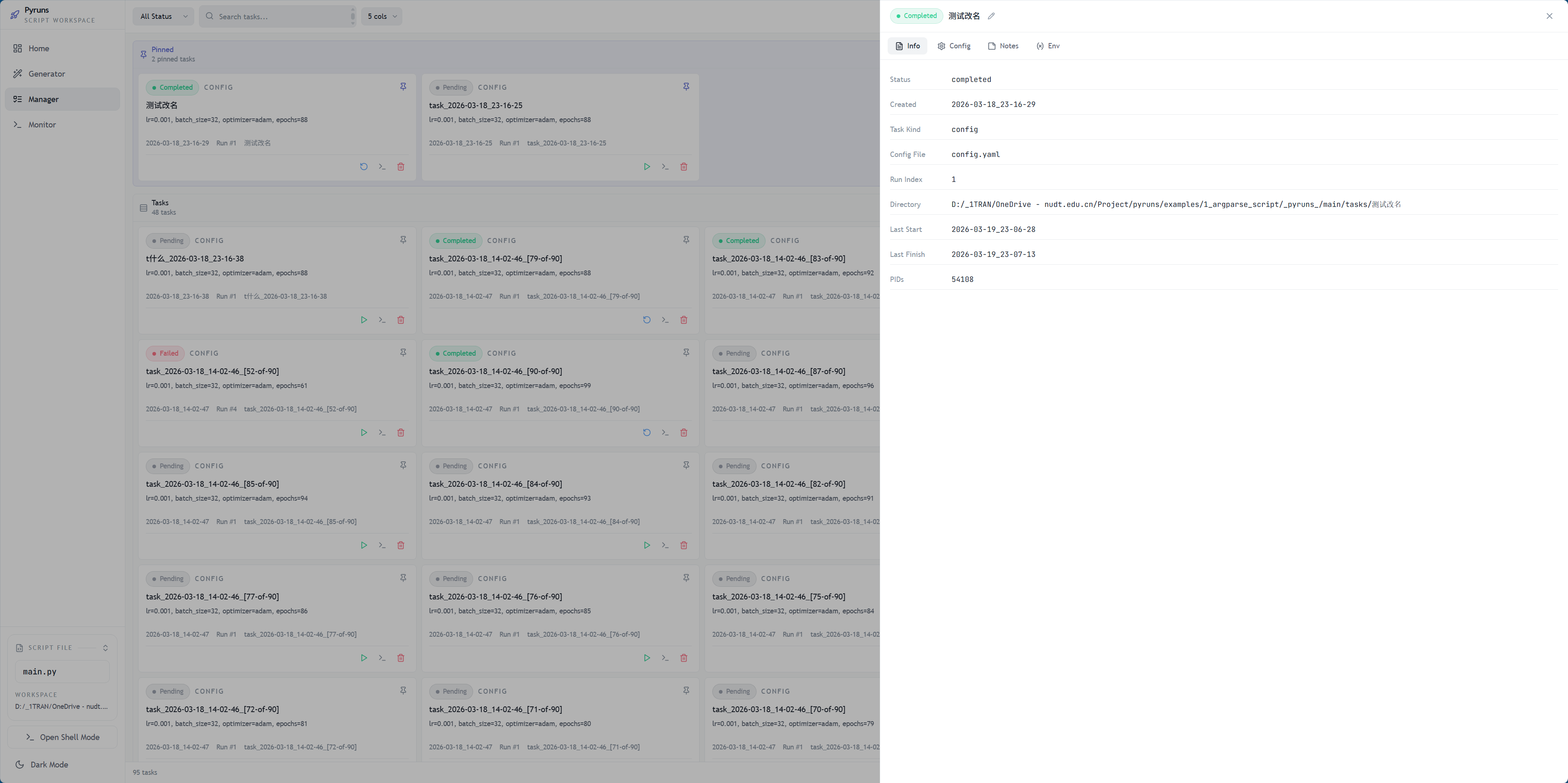
如果你要补一张“配置是怎么落到任务里的”展示图,最值得补的是:
Info与 Run History 详情面板截图Config中的config.yaml/ shell payload 截图Env面板截图